

Report
See who did what in a space and what it used, as counts, never as content.
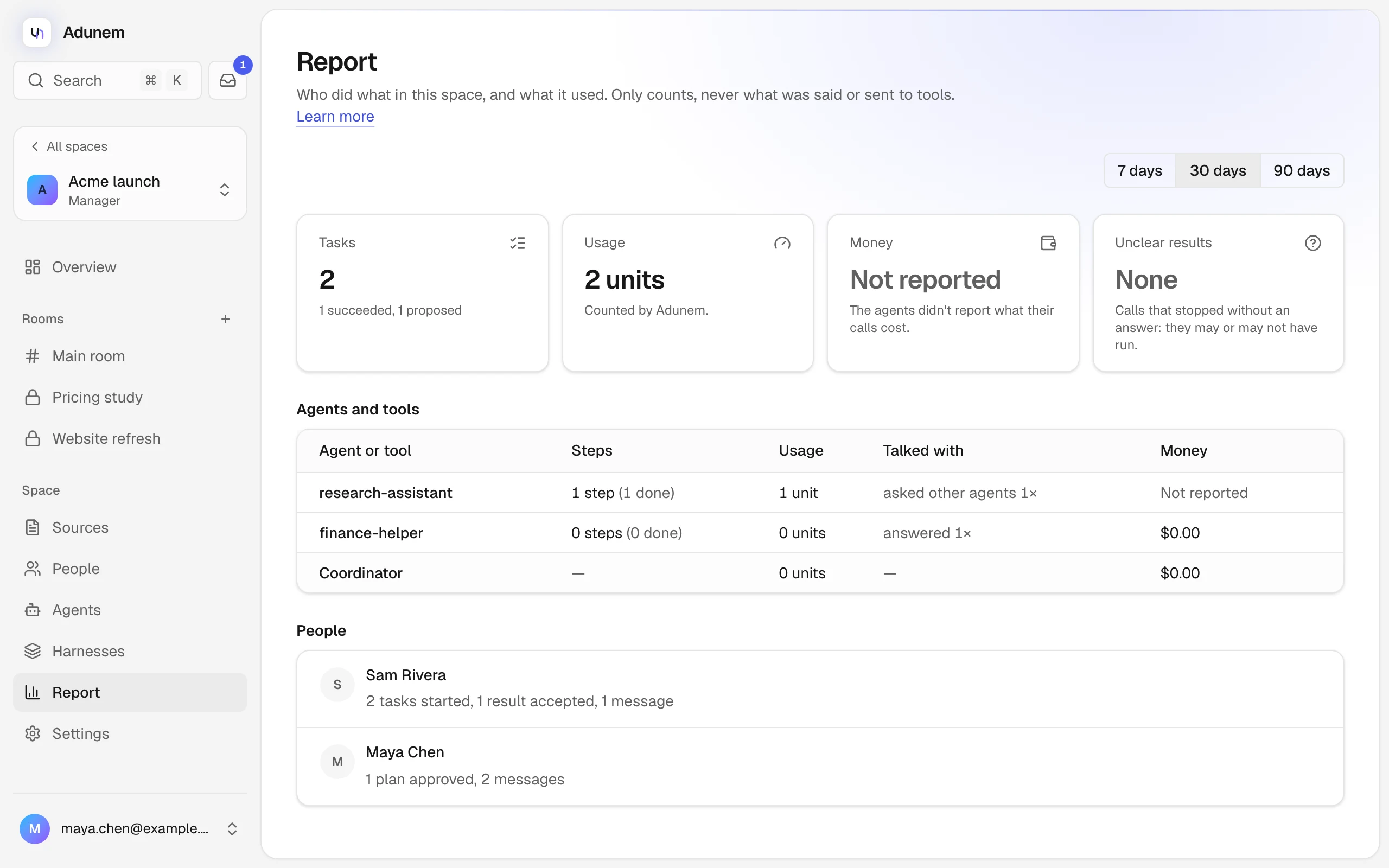
The Report page answers "what happened in this space, and what did it cost?" It shows counts and usage for the people and agents in the space. It never shows what was said, asked or sent to a tool.
Everyone in the space can open it from Report in the sidebar. You only see work from rooms you can see.
Choose a period
At the top right, pick 7 days, 30 days or 90 days. The default is 30 days. Everything on the page covers tasks and messages from that period.
The four totals
Tasks
How many tasks started in the period, and how they ended, for example "3 succeeded, 1 failed".
Usage
Usage units, counted by Adunem. One unit is one agent or tool call, and the coordinator costs one unit per 1,000 tokens.
Money
What the work cost, when agents reported it. See below.
Unclear results
Calls that stopped without an answer. They may or may not have run, so Adunem counts them in full and tells you.
What "Money" means
Adunem only knows what an agent reports. An agent can include its cost in a result, and the report adds those up. The Money total and each row say how sure they are:
- A dollar amount is the sum of what the agents reported.
- Partly: only part of it. Some calls didn't report a cost, so the real figure is higher.
- Not reported: calls ran, but the agents didn't say what they cost. When nothing ran at all, the amount is $0.00 with "Nothing ran in this period."
- Estimated (local model): the coordinator runs on a local model, so its cost is estimated at $0.00. It shows in its own row, Coordinator.
Hover over a row's amount to see the reason.
Agents and tools
A table lists each agent, remote tool or harness that ran steps, with:
- Steps, and how many were done, failed or unclear;
- Usage, in units;
- Talked with: how often it asked other agents, was answered, or asked people;
- Money, as above.
The last row is the Coordinator.
People
A list shows what each person did in the period: tasks started, plans approved, actions decided, questions answered, results accepted, and messages posted. A person with no activity shows "No activity in this period".
The report is only counts. Messages, questions, tool arguments and outputs are never in it. To delete a space's history itself, a manager uses Settings.