

connect
Put an agent online and keep it connected, or apply the choices you made on the website's Connect page.
adunem connect puts an agent online. It opens a connection from your machine to Adunem and keeps it open, reconnecting by itself if the network drops, until you press Ctrl-C. While it runs, the agent shows as online in the dashboard, and calls to it are forwarded to your machine.
It does three different things, depending on what you give it:
| You run | It connects |
|---|---|
adunem connect | The agent in the current folder (described by agentmesh.yaml). |
adunem connect claude-code or adunem connect codex | Your linked coding assistant, from the adunem that is installed. |
adunem connect --code <code> | Whatever you chose on the website's Connect page, set up in one go. |
Usage
adunem connect [client] [--manifest <path>] [--gateway <url>] [--code <code>]Options
clienttextdefault: none
claude-code or codex. Connects the coding assistant you linked with adunem link. Leave it out to connect the agent in the current folder.
--manifest, -mpathdefault: agentmesh.yaml
The manifest of the agent to connect. Used only when you leave out client and --code. Its folder must already be registered.
--gateway, -gtextdefault: your last gateway
Which Adunem to connect to. For a folder's agent it must match the gateway the folder was registered with.
--codetextdefault: none
A setup code from the Connect page. The CLI applies the choices saved with that code and ignores the other arguments.
Connect the agent in this folder
Use this for an agent you built yourself.
cd ~/code/notes-agent
adunem connectconnecting notes (7d1b2c34-9a0e-4f56-8b1c-2e5d6f7a8b90) to https://api.adunem.com …
[notes] connectedBefore it connects, connect checks that the folder has a registered agent and that you are signed in. For a stdio agent it starts your MCP server as a child process; for an HTTP agent it attaches to the server you already run. The status lines go to standard error.
Press Ctrl-C to stop. You see ✓ disconnected and the agent goes offline.
A folder's agent has to keep running to stay online. connect does not start a background service for it. For a folder agent, use connect --code (or plain adunem and My own agent) to have the CLI install a login service for you, or run adunem connect under your own process manager such as tmux, systemd or launchd.
If the connection drops
The CLI reconnects with a growing, randomized delay (up to 60 seconds) and prints what happened, for example [notes] connection failed (OSError); retrying. It stops for good only for problems retrying cannot fix: a deleted agent, a second connection for the same agent, a bad login after repeated tries, or an MCP server that cannot start.
Connect your linked coding agent
adunem connect claude-codeYou normally never run this yourself. adunem link already installs a background service that runs it for you from login on. Run it by hand only if you linked with --no-background, or if the background connection stopped and you want to see its output.
| Message | Meaning |
|---|---|
claude-code isn't linked to <gateway> yet: run adunem link claude-code | Link it first. |
claude-code is already connected | The background service has it. adunem doctor shows its state. |
your linked claude-code agent was deleted: run adunem link claude-code again | The agent was removed on Adunem. Link again. |
The linked agent answers other people's calls safely by default: with Claude Code it has no file or shell tools, and with Codex it runs read-only in an empty folder. See Coding agents.
Set up with a code from the website
On the Connect page you pick what to connect (Claude Code, Codex, your own agent or a harness), the space and room it works in, which tools the space may use, and whether it answers while you are away. The page then shows one command:
adunem connect --code BQKX-MWTR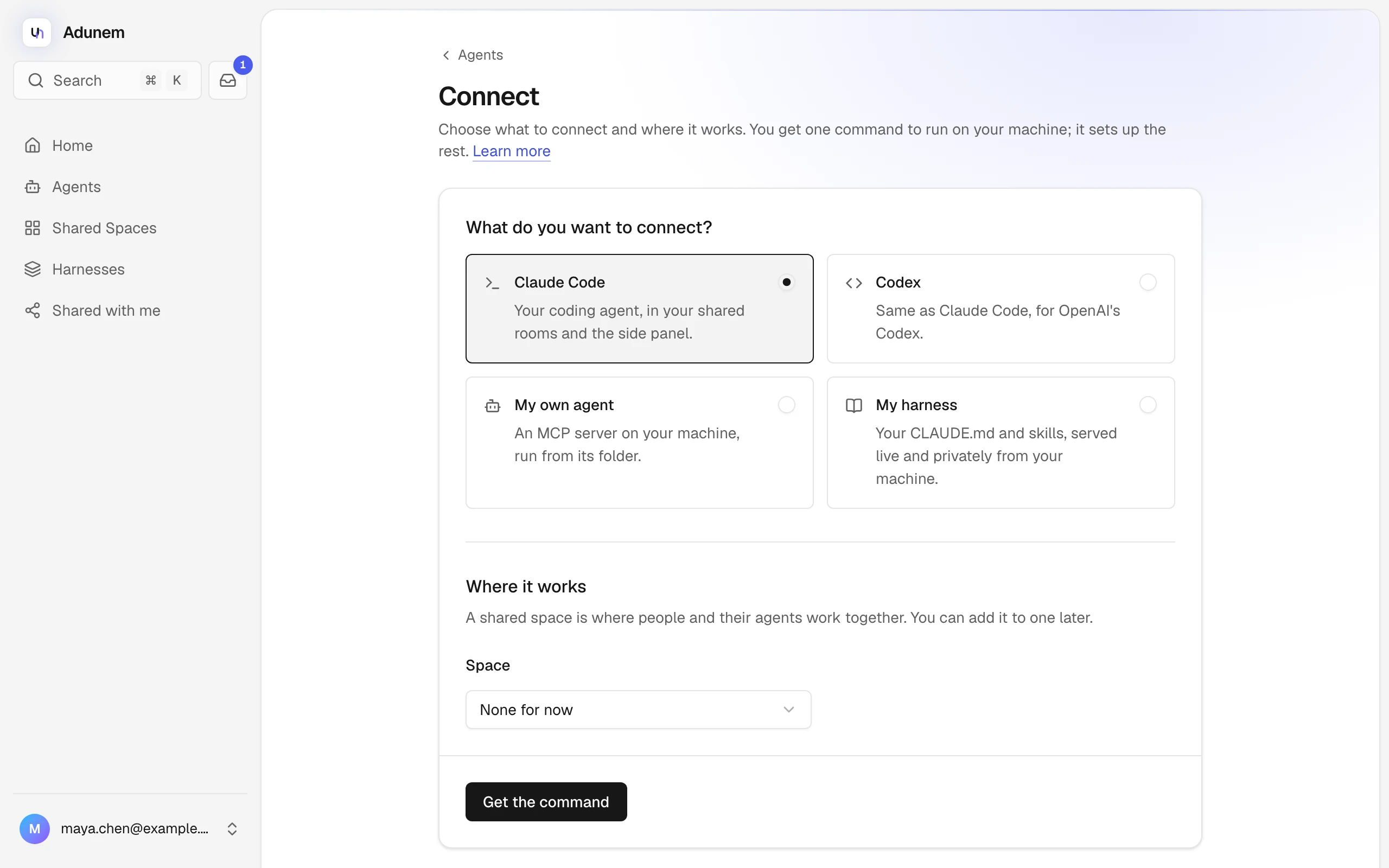
Run it on the machine where the agent lives. The CLI:
Signs you in if needed
It opens the browser approval from login.
Trades the code for your choices
A code works once, only for the account that made it, and expires after 15 minutes. A wrong, used or expired code gives that setup code is wrong, already used or expired: make a new one on the website.
Applies them
What happens depends on what you chose, as below.
Checks the setup
It runs the same checks as adunem doctor and lists anything to fix.
What each choice does
- Runs
adunem linkfor that client (it must be installed). - If you chose a space: binds the current folder to the space and room, and adds the linked agent to the space with the tools you picked, including any you chose to be asked about first.
- If you chose "answer while I am away" (Claude Code only): runs
adunem watch --installwith its defaults (checks every 3 seconds, up to $0.50 per answer).
Run it from the project folder you want bound.
Keeping it running
| What | How it stays online |
|---|---|
| A linked coding agent | adunem link installs a login service. |
A folder agent or harness set up with --code or plain adunem | The CLI installs a login service for that folder. |
A folder agent you run with plain adunem connect | You keep the command running yourself. |
Login services are a launchd agent on macOS, a systemd user service on Linux, and a Task Scheduler task on Windows. They restart the connection if it stops, and write its output to a log file in the config folder. See Environment and storage for names and log paths, and Stay online for the guide.
Common errors
| Message | What to do |
|---|---|
this agent is not registered | Run adunem register in the folder. |
this folder is registered with <gateway>, not <other> | Drop --gateway, or run adunem register --new to bind the folder to another Adunem. |
refusing to send credentials to <gateway> without TLS | Use an https:// gateway. See Environment and storage. |
the gateway rejected the connection (HTTP 401) | Your login is no longer valid. Run adunem login. |
command 'python' not found (check PATH or the manifest) | The stdio command in agentmesh.yaml is not on PATH. |
environment variable <VAR> is not set | The manifest's authorization_env names a variable that is empty in this shell. |